
Facebook video download not working? The seven real cases
Almost every failure is one of seven cases: a private or group video, a link the tool cannot recognize, a source video with no HD, an fb.watch link that needs a second try, a slow or blocked transfer, the iPhone player behaviour, or a silent NO AUDIO file. Each is explained below.
An error message is only useful if it tells you what to do next. Here are the seven situations behind nearly every failed download, in the order people meet them — each with the cause and the fix, or an honest "this one cannot be fixed" when that is the truth.
Case 1 — "This video looks private or cannot be found"
The link is valid, but the video is not public: friends-only, private, deleted, or restricted by age or region. No online tool can fetch it, and any site claiming otherwise is misleading you. If the video is yours or a friend's, ask them to switch it to Public, or download it from the original device. There is no workaround — that is the privacy setting doing its job.
Case 2 — "Link not recognized"
The pasted text is not a Facebook video link the tool can read: a profile link, a photo, a page link, or a link copied from inside a group (group videos are not supported, even public ones). Fix: open the video itself, use Share → Copy link from the video's own menu, and paste that. Accepted shapes: /watch/?v=…, /reel/…, /videos/… (fb.watch short links must first be opened in your browser so they expand to the full address).
Case 3 — The HD quality is missing
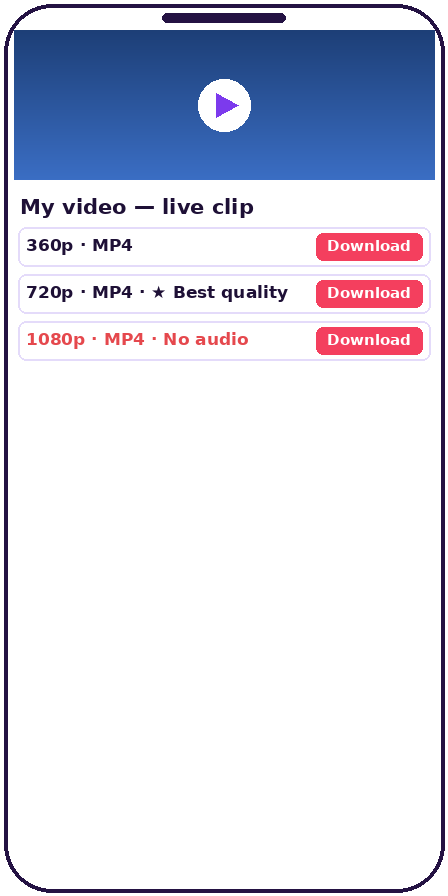
If the result tops out at 480p or 360p, the source video was never encoded in HD — many older uploads and quick phone posts only exist in standard definition. The tool lists what Facebook actually has; it cannot invent resolution that is not there. A complete result always stars its best line, like this:
Case 4 — An fb.watch link does not respond
The short fb.watch link must first be expanded to the full video address. Occasionally that redirect stalls. Paste the link a second time; if it still fails, open the link once in your browser, let the video page load, and copy the full address from the address bar instead.
Case 5 — The download seems blocked or very slow
Files are served by Facebook's own servers, so speed is Facebook's and your connection's, not the tool's. On a stalled transfer: check the connection, avoid downloading the largest quality on a weak mobile signal, and remember the file keeps arriving in the browser's download list even if you leave the page. A download manager prompt ("keep this file?") is your browser being cautious with large files — confirm it.
Case 6 — On iPhone, "nothing downloads"
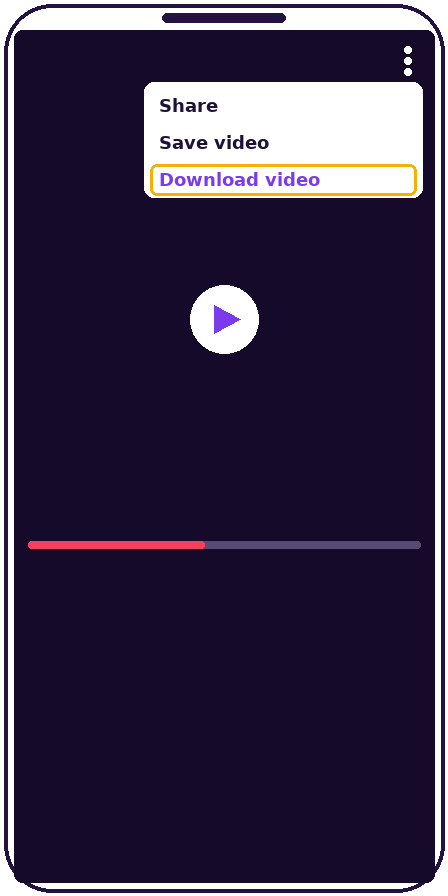
What usually happens: tapping a quality opens the video player in Safari instead of a save dialog. The fix is inside the player — open its menu (three dots, top right) and tap Download video; the file then lands in the Files app under Downloads, not in Photos. Our iPhone guide covers the whole path with the Safari settings that matter.
Case 7 — The downloaded file has no sound
You saved a video-only stream: at some resolutions Facebook separates picture and sound, and those lines are tagged NO AUDIO in the result list. Download a line without the tag for a normal file with sound, or grab the Audio only · MP3 line if sound is all you wanted.
Still stuck after all seven? Note the exact message and the kind of link (never the full link if the video is not yours to share) — and try the same link in the downloader once more; transient Facebook hiccups clear themselves more often than any other cause.
Frequently asked questions
Why does a group video fail even when the group is public?
Facebook serves group videos through a separate mechanism that online downloaders cannot read. Public or not, group videos are outside what this tool supports.
Can a tool add HD to a video that only shows 360p?
No. The list mirrors the renditions Facebook encoded. If HD is not listed, it does not exist for that video — any "HD unlock" claim is marketing, not engineering.
The download stopped halfway. Do I start over?
Check the browser's download list first: many browsers resume or hold the partial file. If it failed outright, re-tap the same quality — the link options are generated fresh each time.
Is an error ever caused by the video being a livestream replay?
A finished, public livestream replay downloads like any video. A stream that is still live cannot be downloaded until it ends and Facebook publishes the replay.